SSD Upgrade Kit - Support
Resources
Frequently asked questions
No. If you forget the password for this drive, it cannot be accessed. Be aware that forgetting your password is not covered under Kingston’s warranty.
The only exception to this is using a master or administrative password for the drive in addition to the user password. Using a master password would allow an administrator to reset the user password.The system BIOS would have to support a master password and user password for hard drives and it would have to be enabled at the time you initiated the user hard drive security password. Using a master password would allow an administrator to reset the drive.
FAQ: KSD-011411-BUN-02
This program, used to clone your existing hard drive to your new SSD does not run in Windows. In order to use this software, you must boot the computer from this CD.
You will see a menu where you can choose to boot into Windows or Run the Acronis True Image software.
FAQ: KSD-011411-BUN-03
Yes. The SSDNow is compatible with the USB enclosure included with the bundle kit that Kingston offers. However, internal testing shows that the cloning process (in some systems) may not copy the Master Boot Record (MBR) properly when the SSDNow (destination drive) is attached via the USB enclosure.
Even though the cloning process will appear to have completed successfully, the system will fail to boot when the drive is later configured as the boot device. Visually, the user will experience a blinking cursor at boot up.
For the best user experience, Kingston recommends that you install the hard drive (source drive) into the external enclosure and the SSDNow (destination drive) into the notebook for the purpose of a successfully cloning process on a consistent basis.
FAQ: KSD-030111-BUN-04
The system isn't freezing. It is the keyboard and mouse not working. Enable legacy keyboard and mouse support or USB legacy support under Integrated Peripherals in the BIOS.
FAQ: KSD-051911-BUN-05
No. Acronis True Image will not work in a Mac.
FAQ: KSD-052411-BUN-06
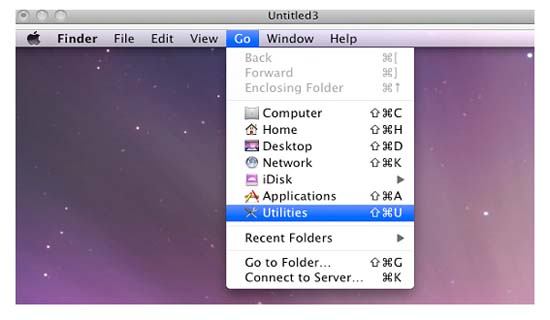
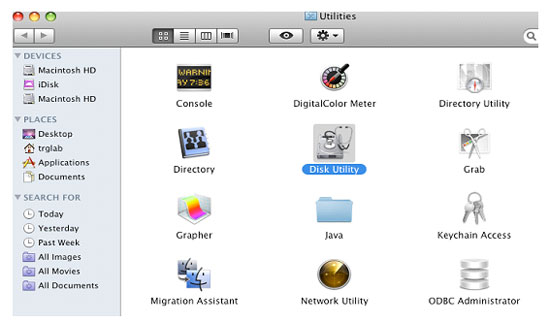
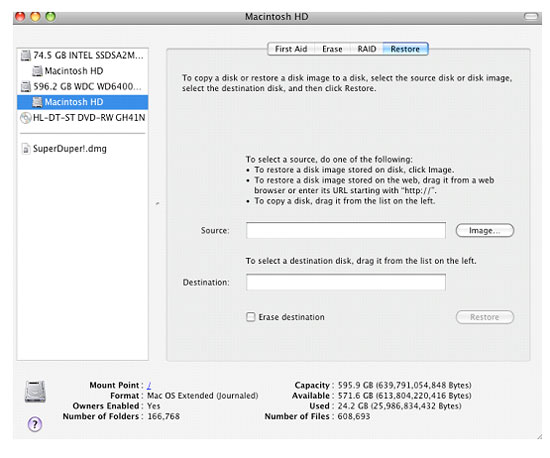
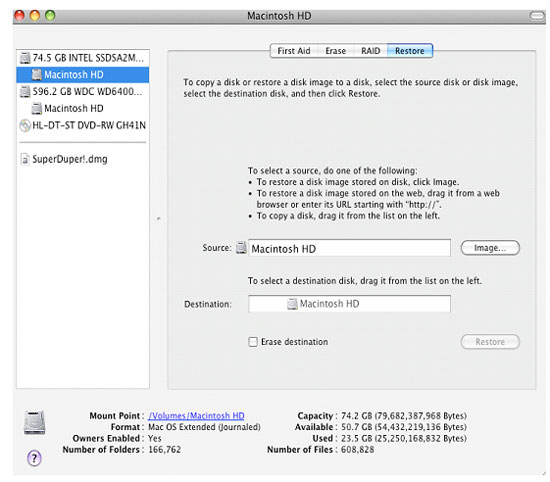
Cloning can be performed with Bootable disc utility or directly within the OS as seen below.
Note: You can utilize this same procedure in cloning drives on a laptop with the enclosure.The SSD can be placed in the enclosure when cloning, the HDD does not have to be removed until the cloning is complete.
- Access “Utilities”
- Select “Disk Utility”
- Select startup volume (this will be the system’s bootable, primary volume) and click on the “Restore” tab
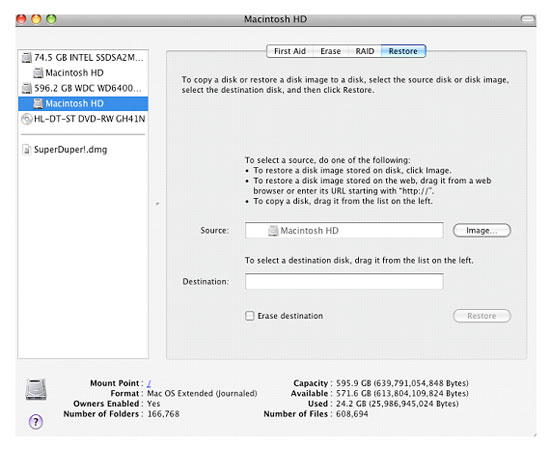
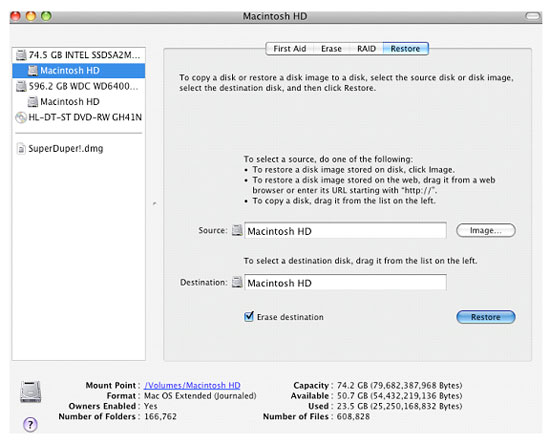
- Drag Startup Volume “Macintosh HD” to “Source” location
- Drag Mounted Volume “Macintosh HD” (this should be located directly under the SSD Volume, see above image) to “Destination” location.
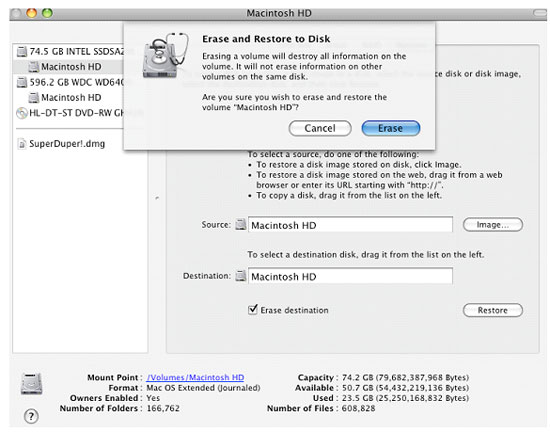
- Check “Erase Destination” and select “Restore”
- Select “Erase”
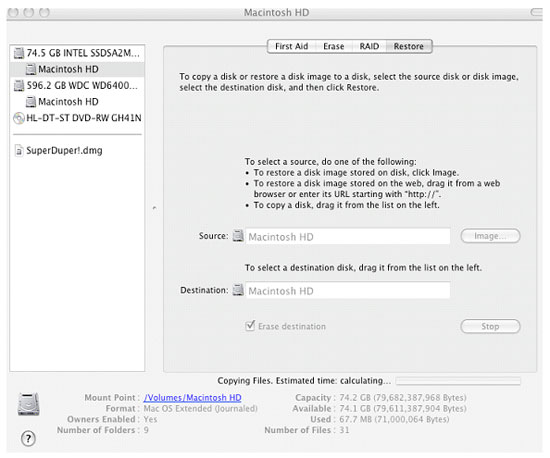
- System will start calculating estimated time and copying files
- Drive should be bootable once file copying is complete.
FAQ: KSD-052411-BUN-07
The current version of Acronis may not be compatible with some USB 3.0 controllers. The solution is to use a USB 2.0 port during the cloning process. Once this is done, the enclosure can be used in USB 3.0 ports.
FAQ: KSD-071811-BUN-08
Acronis does not support Unified Extensible Firmware Interface (UEFI). This is what the computer uses instead of a traditional BIOS. In order to clone your system, you need to open the BIOS or boot menu for your system and choose to either disable UEFI boot or enable legacy boot. Remember to go back into the BIOS and re-enable UEFI boot before booting from the new SSD.
If this still does not work, please contact our technical support staff for us to send you an updated version of Acronis.
FAQ: KSD-041113-BUN-09
The TRIM feature on the latest Acronis disk has been found not to work on some SSDs. However, this is not something that is needed in order to clone your hard drive and all the features related to cloning on the Acronis disk have been verified to work with Kingston SSDs. Be aware that all of our SSDs support TRIM commands in TRIM supported operating systems.
FAQ: KSD-041113-BUN-10
The latest version is on a DVD-ROM. The previous version is on a CD-ROM. The latest version includes videos on the disk. The previous version does not. The new version will have ©2013 printed on the front of the disk.
Also under the help section when running Acronis, choose "about". This will show the version. If it shows 5289 or higher, you have the newer version of the Acronis software.
FAQ: KSD-041113-BUN-11
Kingston recommends updating your SSD to the latest available firmware, where possible. You can check to see if your drive has an available update by using Kingston’s SSD Manager software.
FAQ: KSD-012010-001-25