Kingston IronKey Locker+ 50 G2 USB Flash Drive
FIPS 197 certified, AES 256-bit encrypted
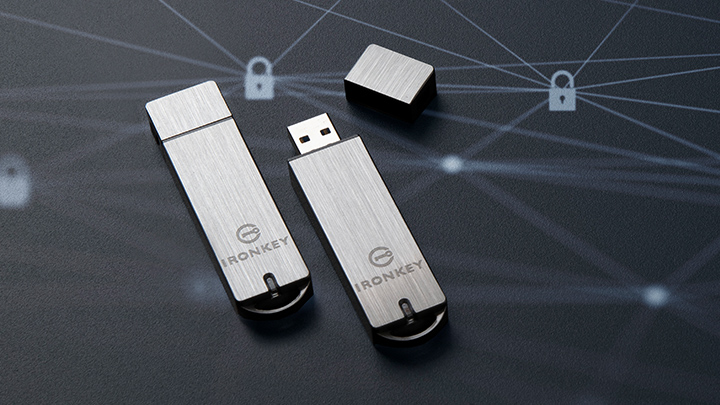
Kingston IronKey™ Locker+ 50 G2 USB Flash drive provides enterprise-grade security with FIPS 197 certified AES 256-bit hardware-encryption in XTS mode, including safeguards against BadUSB and brute force password attacks. LP50 G2 is also TAA compliant.
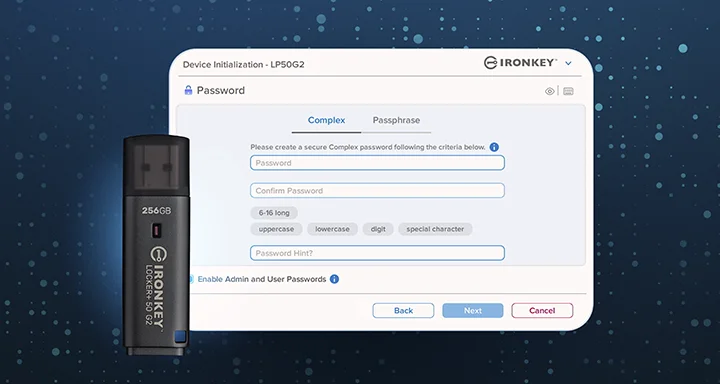
LP50 G2 with newly redesigned modern casing supports a multi-password (Admin and User) option with Complex or Passphrase modes. Complex mode allows for passwords from 6-16 characters using 3 out of 4 character sets. Passphrase mode allows for a numeric PIN, sentence, list of words, or even lyrics from 10 to 64 characters long. Admin can enable a User password, or reset the User password to restore access to data. To aid in password entry, the “eye” symbol can be enabled to reveal the typed in password, reducing typos leading to failed login attempts. Brute force attack protection locks out User upon 10 invalid password entries in a row and crypto-erases the drive if the Admin password is entered incorrectly 10 times in a row. Additional features include anti-fingerprint coating and a built-in virtual keyboard to shield passwords from keyloggers or screenloggers.
Locker+ 50 G2 is designed for convenience with metal casing and built-in key loop to take your data anywhere. LP50 G2 is easy for anyone to setup and use, with no application installation required; all the software and security needed is already on the drive. Works on both Windows® and macOS® so users can access files from multiple systems.
| Key Certification | FIPS 197 certified TAA Compliant |
| Interface | USB Type-A |
| Standard/Speed{{Footnote.N78252}} | USB 3.2 Gen 1 32GB – 256GB: 145MB/s Read, 115MB/s Write |
| Capacities{{Footnote.N47164}} | 32GB, 64GB, 128GB, 256GB |
| Dimensions | 60.56mm x 18.6mm x 9.6mm |
| Weight | 22.94g |
| Casing Material | Metal + Plastic |
| Operating temperature | 0°C~50°C |
| Storage temperature | -20°C~85°C |
| Minimum System Requirements | Two (2) free consecutive drive letters required for use{{Footnote.N37142}} |
| Compatibility | USB 3.0/USB 3.1/USB 3.2 Gen 1 |
| Warranty/Support | Limited 5-year warranty with free technical support |
| Compatible with | Windows® 11, macOS® 13.x -26.x |
-

FIPS 197 Certified with XTS-AES 256-bit Encryption
-
Brute Force and BadUSB Attack Protection
-
Multi-Password (Admin and User) Option with Complex/Passphrase Mode
-
Additional Security Features
-
The Kingston Ironkey Locker+50 G2 delivers on its pronises. It provides strong hardware-based encryption in a compact , professional-looking USB drive.
-

Kingston’s IronKey Locker+ 50 G2 USB Flash Drive (32GB) is a great, secure storage solution... We loved the overall experience..
-

The Locker+ 50 G2 is perfect for home and business users. When you need to carry sensitive data, Kingston covers you with the best-secured USB flash drives on the market.
Key features
Enterprise-grade hardware-encrypted USB drive
FIPS 197 Certified, XTS-AES 256-bit encryption safeguards important data with built-in protection against BadUSB & brute force attacks.
Multi-password option with Complex/Passphrase modes
Admin can reset a User password to restore User’s access to data with either Complex or Passphrase password mode. Passphrases can be a numeric PIN, sentence with space characters, list of words, or even lyrics – from 10 to 64 characters long.
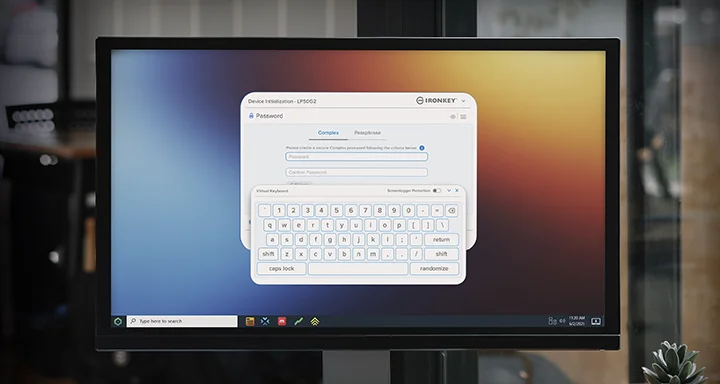
Additional security features
Reduce failed login attempts and frustration by enabling the “eye” button to view the typed password. LP50 G2 has anti-fingerprint coating and a virtual keyboard to shield password entry from keyloggers and screenloggers.
Related Videos
IronKey Locker+ 50 G2 Quickstart Guide
This video walks you through the simple setup process to ready your Kingston IronKey Locker Plus G2 Encrypted USB Flash Drive for use.
IronKey Locker+ 50 G2 Walkthrough
This video walks you through the additional features of the Kingston IronKey Locker+ 50 G2. But first, the Quickstart guide can help you get started, if you haven’t already set up your drive.
Related Articles
-
What is encryption and how does it work?
Looking for improved data security & need to know what is encryption? Kingston covers the basics.
-
How to securely password protect files and drives
Hardware, not software-based password protection, is the best way to protect files and drives.
-
Everything you need to know about encrypted USB drives
Discover how encrypted USB drives protect your data, and which type fits your needs.
-

Organising your media collection
Kingston provides advice on making your family media collection efficient and user friendly.
-

Healthcare data breaches: A persistent threat despite cost reductions
Breaches remain a major threat. Explore the need for comprehensive cybersecurity measures.
-

How to choose the right drive for your data
Here is a list of USB security features to consider for data protection.
-

The 3-2-1 data backup method: your best defence against ransomware attacks
Learn what the 3-2-1 data backup method is and why it is your best defence against ransomware.
-
Expert best practices for safeguarding your information
Learn data security best practices with Dr. Vynckier, and the importance of offline backups.

-
Defense in Depth: Expert insights on building a multi-layered cybersecurity strategy
David Clarke covers encryption, super user safeguards, vulnerability management, and training.
-
How EgoMind secured hybrid work data with Kingston IronKey
Learn how Kingston IronKey's solutions helped EgoMind enhance their data security hygiene.
-
NIS2, DORA and the significant role of encrypted storage – Expert insights
We discuss NIS2 and DORA, and how organisations can turn compliance into an opportunity.
-
Changing behaviours towards encrypted storage – Expert insights
We discuss the shifts in how organisations are storing and encrypting sensitive data.
-
Emailed password-protected documents: the new and silent breach
Kingston examines how to secure sensitive files with the increasing vulnerability of email.
-
The NIS2 directive: Strengthening cybersecurity against cybercrime
Learn how Kingston IronKey hardware-encrypted solutions supports NIS2 Directive compliance.
-
Enhance small business cybersecurity with Kingston Ironkey
Kingston IronKey has hardware options to protect small and medium businesses against cybercrime.
-
Why you need to upgrade to FIPS 140-3 Level 3, military-grade mobile data protection
FIPS 140-3 Level 3 is certified by the world-leading agency NIST as the apex of encryption.
-
What is the difference between software and hardware-based encryption?
Our infographic showcases the differences between software and hardware-based encryption.
-
2024: Technology experts’ predictions
2023 has been a year full of challenges and innovations. But what will 2024 bring?
-
How to protect your SMB from ransomware
Learn about two methods that give SMBs superior resilience vs ransomware: encryption and backups.
-
How to allow USB drive access without compromising endpoint security
In this whitepaper, we explain how to enforce a DLP strategy, while allowing USB drive use.
-
IP ratings for a product’s resistance to water, dust and more explained
We explain the meaning behind IP (ingress protection) ratings for water and dust resistance.
-
Enterprise-grade versus military-grade security: what’s the difference?
Enterprise-grade and military-grade digital security: two high standards with different requirements.
-
A secure cloud in your pocket: hardware-encrypted drives for travelling lawyers
Learn how hardware encryption can protect a travelling lawyer’s confidentiality with secure file storage.
-
The benefits of penetration testing for hardware encrypted drives
How is pen testing ensuring Kingston IronKey USB drives lead the way in trusted data security?
-
25% rise in lost devices reveals data security threat for Londoners
Hardware encrypted Kingston IronKey drives protects organisations’ data on the move.
-
Bring your own device: security measures for personal devices in the workplace
Bring your own device (BYOD) policy is tricky for employers. How to balance security & convenience?
-
What is data loss prevention (DLP)?
DLP offers tools for network admins to protect sensitive data from cybercrime and negligence.
-
The hard truth of proper security for healthcare data
A look at how the requirement for data encryption can be key to any organisation's security strategy.
-
Staying secure when remote or travelling
How can we bolster network security with remote working and international travel so common now?
-
Encrypted USB flash drives: Cheaper than legal fees
Invest in encrypted drives so you do not incur expensive legal fees if they are lost or stolen.
-
Why is Kingston IronKey trusted by national cybersecurity organisations?
Discover why national security agencies trust Kingston IronKey to protect their data.
-
Hybrid working environments will mean increased data vulnerability
A company’s IT specialists should be expected to add data security to the PCs of remote workers.
-
What you need to know when building your data loss prevention strategy
Kingston’s three key practices for robust DLP for businesses that handle sensitive data.
-
Using an encrypted USB flash drive with an iPhone or iPad
You can read and write to an encrypted USB flash drive with an iPad or iPhone with the right adaptor. Here’s how.
-
Safeguard your law firm’s sensitive data with hardware-encrypted drives, not software
Learn why hardware encryption beats software encryption for law firm data protection.
-
What is data security software?
A brief explaining the purpose and types of data security software available.
-
The benefits of passphrases
Passphrases are superior to complex passwords for keeping data secure, with many powerful benefits.
-
Secure data in transit
HIPAA requires healthcare organisations to keep patient data safe at all times, including in transit.
-
NYDFS 23 NYCRR 500 Cybersecurity Requirements
This requires encryption of sensitive data, appointing a Security Officer, cyber security programmes and policy adoption.
-
Security for all sizes – Proactive protection from SME to enterprise!
Kingston IronKey encrypted USBs are a security consideration for organisations of all sizes.
-
USB storage: Does hardware encryption prevent risks?
We compare unencrypted and encrypted USB drives and explain how to keep data secure!
-
How an energy specialist protected their partner's IP with Kingston IronKey
Learn how Kingston IronKey is protecting the intellectual property with customisation.
-
How does Kingston IronKey protect global financial services?
Discover why Kingston IronKey is the go-to solution for protecting financial services data.
-
Why does the military rely on Kingston IronKey?
Learn how Kingston IronKey is securing the military operations’ data.
-
Using and promoting encrypted USB flash drives in your organisation
How can you get your organisation to use encrypted drives and make them part of your security policy? Here are some tips.
-
Prevent telecoms data leaks in the field with Kingston IronKey
Learn how Kingston IronKey is protecting telecoms industry's data using encryption.
-
Encrypted storage for creatives
Encryption is an incredibly helpful option for creatives to protect their clients’ important files.
-
How Kingston IronKey can be a strategic performer
Kingston IronKey encrypted USBs: a small but important part of any organisation’s security strategy.
-
Post pandemic commuters are 22% more likely to lose their devices
Kingston IronKey can help mitigate data loss due to the rise in lost electronic devices.
-
Why are USB drives still relevant today?
In this eBook, we explore how Encrypted USB drives have become a key tool in keeping data secure.
-
Setting Up Kingston IronKey™ Vault Privacy 80 External SSD
How to use your IronKey Vault Privacy 80 External SSD: set password, connecting to a PC and more.
-
Protect Private Mobile Data in Healthcare
Organisations are considering data security options to protect against private mobile data breaches.
-
Finance industry: Keeping sensitive data safe with Kingston IronKey
Discover how Kingston IronKey is protecting the sensitive data of the finance sector.
-
Protecting critical data in the energy sector with Kingston IronKey encrypted drives
Here is how Kingston IronKey helped protect the sensitive data of the Energy industry.
-
Cybersecurity – How to stay ahead in 2022
We explore our KingstonCognate experts’ thoughts on cyberthreats and cybersecurity challenges.
-
Transporting and protecting data outside your firewall
Protecting data on the move with superior hardware-based Advanced Encryption Standard (AES) 256.
-
Software encryption and regulatory compliance: Less expensive solution with major security risks
Users can disable software-based encryption, which can lead to legal fees if the drive is lost.
-
How to stay secure in a digitised world
We explore Tomasz Surdyk's thoughts on how all entities can stay secure in the digitised world.
-
FBI warns that hackers are mailing malware on USB drives to their targets
Don’t plug any USB drives into your computer if you don’t know exactly where they came from.
-
What businesses need in their work-from-home enablement
What we learned from Kingston’s experts and tech influencers on work-from-home enablement Twitter chat.
-
Is encrypted storage needed if you use the cloud?
There are benefits to using both cloud storage and hardware-based encryption.
-
Top 12 tips SMEs can take to enhance cybersecurity
We explore the top 12 tips small and medium size enterprises can take to enhance cybersecurity.
-
Kingston’s 3 predictions for the data center and enterprise IT in 2022
We’ve examined several factors using unique research to identify what may impact markets globally in 2022.
-
2022: Technology expert predictions
2021 has been a year full of challenges and innovations. But what will 2022 bring?
-
How to close the security gap for small and medium size enterprises
Prof Sally Eaves shares her thoughts on the SME cybersecurity landscape and the need for education & support.
-
Sustained commitment required for cybersecurity
Bill Mew shares his thoughts how the largest security challenges need commitment from the boardroom.
-
21st Century Private Diary
Write your diary digitally with a password protected, cloud backup solution.
-
Data loss prevention in our remote working world
The use of DLP software, VPNs, Encrypted SSDs and USBs, will help mitigate some risks of remote working.
-
What is the difference between hardware vs software-based encryption for encrypted USB flash drives? - Kingston Technology
There are many advantages to using a dedicated hardware encryption processor in USB flash drives.
-
Influencers Tech insights for 2021
What will 2021 bring in Tech and trends? What do our KingstonCognate members and industry experts predicting for the future?
-
Who is responsible for cyber security and privacy?
Cyber security and data privacy are everyone’s responsibility. What are the key considerations?
-
7 easy tips to increase productivity while working from home
Having a dedicated workspace, setting priorities and eliminating distractions are just a few ways to increase productivity from home.
-
Optimal Endpoint Security Explained and Explored in Partnership with Matrix42
Kingston & Matrix42 partnered to give optimal endpoint security solution in multiple sectors to mitigate risks.
-
C-Suites need to stop taking unnecessary risks
The importance of organisations to consider Revenue, Profit & Risk as equal in organisations to ensure they mitigate data security & cyber security risks. Read this article from Industry Expert, Bill Mew & he will provide you with an insight on this topic.
-
Twitter Chat: Security Experts and Privacy Discuss GDPR in 2020
What do industry experts think has changed since the introduction of GDPR?
-
Work From Home Tips and Tricks
To work from home you need a good workspace for your PC, the right conferencing gear, and a secure connection.
-
Data Protection and Cyber Security in a Post-GDPR Landscape - Kingston Technology
What strategies can organisations use to best secure customers data in a post-GDPR world with the ever-evolving nature of cyber security threats? Kingston pooled the knowledge of some of the UK’s most experienced commentators in cyber security to discuss how data protection has changed since the introduction of GDPR.
-
Mobile Workforce Security eBook - challenges of mobile workforce security
You already know that remote working is a business enabler. But the challenges posed to your network security and compliance with GDPR are too big to ignore.
-
Protecting and Securing your Network, Data, Computers and Company
The recent WannaCry ransomware made global headlines infecting and alerting everyone from government, healthcare, communication providers, automotive companies to corporations and the general public of their vulnerabilities.
-
Major recent example of an unencrypted USB breach
Heathrow Airport in London (30 October 2017) uses unencrypted USB drives for its non-cloud storage. Unfortunately, it was not standardized on encrypted USB drives.
-
Linus introduces the DataTraveler 3.0
Linus breaks down hardware encryption making sure your files are safe and secure, especially when you're on the go. Make sure your portable storage is also safe and encrypted with Kingston Encrypted USB drives.