Ask an Expert
Planning the right solution requires an understanding of your project and system requirements. Let Kingston's experts guide you.
Your web browser is out of date. Update your browser now for better experience on this site. https://browser-update.org/update-browser.html
NVMe technology provides superior storage, superior speed and superior compatibility. Because NVMe utilizes PCIe sockets, it transfers 25x more data than the SATA equivalent. Along with more data, NVMe’s commands are 2x faster than that of AHCI drivers. In addition, NVMe input/output operations per second (IOPS) exceeds 2 million and is up to 900% faster compared to AHCI drives. NVMe also communicates directly with the system CPU giving it incredible speeds due to its compatibility. NVMe drives work with all major operating systems regardless of form factor.

NVMe (Non-Volatile Memory Express) is a communications interface and driver that takes advantage of the increased bandwidth PCIe has to offer. It’s designed to increase performance and efficiency while making a broad range of enterprise and client systems interoperable. NVMe was designed for SSDs and communicates between the storage interface and the system’s CPU using high-speed PCIe sockets without the limitations of form factor.
The NVMe protocol utilizes parallel, low-latency data paths to the underlying media like high performance processor architectures. This offers significantly higher performance and lower latencies compared to SAS and SATA protocols. NVMe can support multiple I/O queues, up to 64K with each queue having 64K entries. This allows input/output tasks to transfer more data faster than older storage models using legacy drivers such as AHCI (Advanced Host Controller Interface). Because NVMe is designed specifically for SSDs, it will eventually become the new industry standard.

Data buses transfer data within a system and when NAND-based SSDs first came out, it was clear to the industry that a new bus and protocol were necessary.
The decision to leverage an existing higher-bandwidth bus technology replaced SATA protocols with PCIe technology. PCIe storage came before NVMe by a few years but since previous solutions were bottlenecked by older data transfer protocols such as SATA and AHCI, it couldn’t be used to its full potential until recent years. NVMe was the solution for the bottlenecks and removes limitations by offering low-latency commands and 64K queues. The multiple queues allow faster data transfers because data is written to SSDs in a scattered fashion using chips and blocks rather than being written on spinning disks like hard drives.
Communication drivers are used by operating systems to communicate data with storage devices. NVMe drivers are faster than AHCI drivers which are commonly found in SATA interfaces.
The NVMe driver communicates directly with the system CPU but the AHCI must communicate with the SATA controller. The AHCI has IOPS (Input/Output Operations Per Second) up to 100K while the NVMe has IOPS over 1 million. IOPS (Input/Output Operations Per Second, pronounced i-ops) is a common performance measurement used to benchmark computer storage devices.

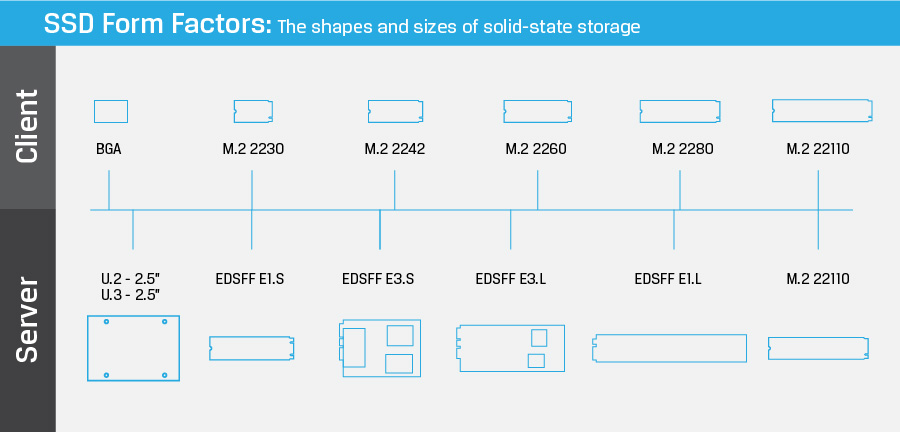
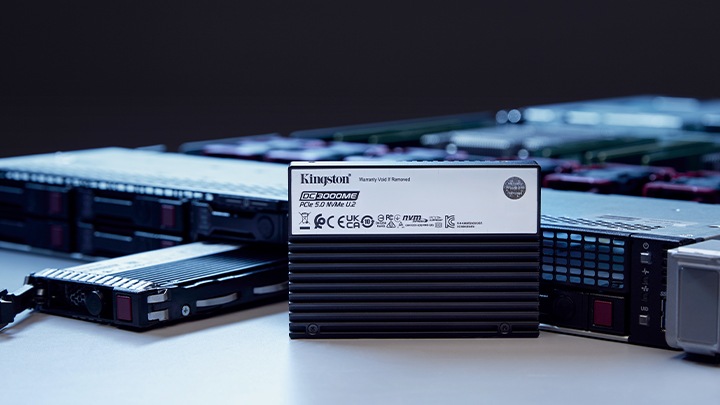
NVMe SSDs come in a variety of form factors but they get specific depending on the use case or application.
There are developing standards and efforts within the EDSFF (Enterprise and Data Center SSD Form Factor) which offers a dynamic range of form factors and standards that share the same protocol (NVMe), the same interface (PCIe), and use their own edge connector (SFF-TA-1002), pinout and functions (SFF-TA-1009).
Was this helpful?
Planning the right solution requires an understanding of your project and system requirements. Let Kingston's experts guide you.
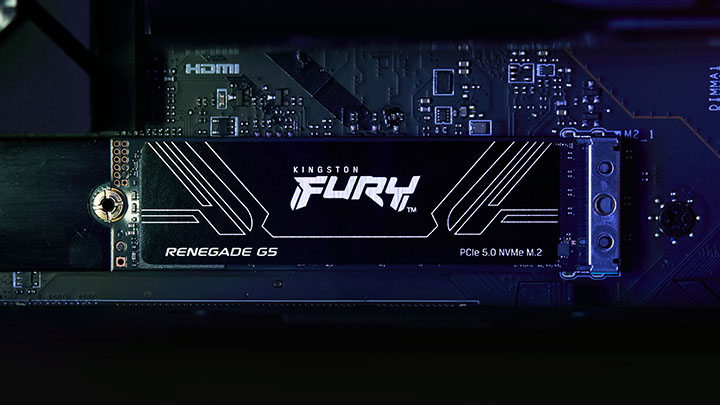
What makes a Gen5 PCIe SSD different from its predecessors? Kingston explains.
Discover the differences between PCIe Gen 3, 4, and 5 SSDs and which one is best for you.
Benefits of NVMe for PC Performance, Gaming, and Content Creation.
NVMe is now the standard protocol for SSDs to empower data centers and enterprise environments.
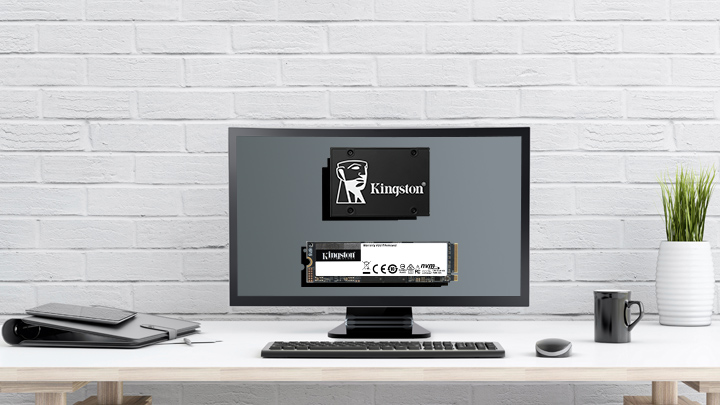
NVMe is the new protocol for flash storage while SATA was hold-over from HDD.
Increased speed and better power efficiency are just two of the benefits.
No products match your current filter selection. Try adjusting your filters to explore more options.
So you want to drastically improve the speed of your PC with an SSD upgrade. But how do you choose?
We show you each step to formatting and erasing an SSD or HDD. We show you each step to formatting and erasing an SSD or HDD.
We explain PCIe Gen 4, how to get it and if you should upgrade.
We explain NVMe and how it is different than the previous drive technologies in an easy to understand video.
How power loss protection helps SSDs safeguard data during sudden power loss.
A real‑world look at modernizing server infrastructure for high‑traffic digital platforms.

SSD test beds for enterprise servers should be done with the real hardware, OS and data. We’ll explain why.
A look at how companies manage their systems when cloud computing is unavailable.
How ECC in memory and SSDs protects data integrity and reliability in server environments.
Your guide to EU data sovereignty, risks, and secure data storage strategies.
10 expert tips for buying server memory: ECC, compatibility, and performance.
Explore server memory types and how each affects server performance and reliability.
Key drivers for IT adoption include the many benefits in virtualizing a data center and consolidating server hardware.
From performance to DDR5, this Xeon 6 guide helps enterprises understand next-gen processors.
Machine learning training is resource-intensive, but how does a Kingston SSD measure up to the task?
Learn why DDR5 server memory improves data center performance and efficiency.
Kingston and Taiwan Intelligent Robotics Company highlight smart manufacturing and AI, powered by Kingston’s trusted technology.
Learn how innovative memory solutions are transforming laptops, desktops, and data centers.
Explore how SSDs are transforming data centers with advanced technology and performance.
Learn how Kingston SSDs transformed Mission Digital’s workflow with speed & capacity.
Join Simon Bestman to explore SSD benefits over HDDs and the latest storage trends.
Reasons why a NAS would benefit your home or small office setup.
System Integrators in India grew their business and reputation using Kingston’s reliable products.
Here is a list of USB security features to consider for data protection.
Learn what the 3-2-1 data backup method is and why it is your best defense against ransomware.
Simon Besteman explains the current and future challenges for data centers.
Explore DRAM technology’s evolution and gain insights into future trends in our eBook.
The differences between SSD classes lies in two components; the processor and the NAND memory.
Learn how Terabytes Written and Drive Writes Per Day are defined, and their differences.
We explore the different types of memory & how to make the right choice for your server.
Read the whitepaper to learn how DC600M helps vSAN demand performance and efficiency.
Kingston sets industry standards with unwavering commitment to quality and reliability.
Kingston and QNAP have improved the efficiency of digital theaters with their hardware.
Questions to ask when seeking the right SSD for your organization’s data center.
Here are some key points to help you better balance price, performance, and longevity.
We explore the how media organizations can speed up workflows through storage and memory.
2023 has been a year full of challenges and innovations. But what will 2024 bring?
Elevate your data center with Kingston's VMware-compatible DC600M enterprise SSDs.
Kingston's server SSD and memory transformed Android Basha's production workflow.
Kingston storage solutions help improve performance photographer Ralph Larmann’s workflow.
DASH Pictures enhances their media production efficiency with Kingston SSDs.
Discover why upgrading your technology in this economy matters more than ever.
Server SSDs have higher endurance, better reliability, and improved performance over client SSDs.
We explore the benefits of upgrading vs. replacing, and how organizations can succeed.
Assess your existing server hardware to extend its lifespan and maximize your investment.
Learn about NVMe and why choosing it is beneficial to your organization’s infrastructure.
We discuss the journey of digital twin technology, exploring real-world examples for success.
In this whitepaper, we explain the benefits of SDS vs. its HW and SW RAID counterparts.
In this video, we explain how Kingston and 2CRSi work together to solve data center challenges.
Learn why APLIGO chose Kingston SSD and memory to support their system integration business.
Choosing storage products for your enterprise is a complex process. Kingston offers our expertise.
Learn how Kingston and QNAP solutions help optimize content creation.
Learn how Kingston supported a leading hosting provider with optimal configuration.
Kingston examines how its DC1500M Enterprise NVMe SSD affects workloads and compares to competitors.
In this eBook, we speak with experts about the journey of data storage, and what the future holds.
From shooting, to post-production, to encoding, to distribution at data centres, SSDs and RAM are powering the world of OTT Media & Entertainment (M&E) video and audio streaming.
We explore the top 12 tips small and medium size enterprises can take to enhance cybersecurity.
This infographic is about the different types of data centers, the myths, and Kingston's DC solutions.
We’ve examined several factors using unique research to identify what may impact markets globally in 2022.
2021 has been a year full of challenges and innovations. But what will 2022 bring?
Read our eBook, about the rise of digital transformation and what the future holds.
Bill Mew shares his thoughts how the largest security challenges need commitment from the boardroom.
Rob May shares his thoughts on how close we are to edge computing and the security it requires.
The high-performance DC500M Server SSD is the best storage choice for a pro videographer.
Memory and storage have evolved over the years. Get an insight from our industry expert.
Our partnership with Microchip’s RAID controllers helps deliver high performance for server storage.
Kingston helped optimize Simply Hosting’s storage in its data centers to ensure they were always on.
Learn how Kingston helped to lower power costs and increase performance so Hostmein could deliver on SLAs.
In this eBook, we speak with experts about IoT’s journey and prepare organizations for IoT’s future.
The pandemic has increased internet traffic which has placed importance on the role of data centers.
Cameron Crandall of Kingston helps you self-evaluate the need to move to your server storage solution to NVMe.
NVMe over Fabric helps CPUs to run more efficiently with lower latency and higher throughput.
Join industry experts to discuss how technology partners like Kingston support their business growth and sustainability.
Industry experts discuss topics like the key pillars of tech relationships, sustainability, and IT optimization.
Watch this webinar to discover the benefits of NVMe SSDs.
The switch to NVMe requires a full stack review from IT architects to ensure redundancy exists on every layer of the stack.
In this eBook, we talk to industry experts as we explore the benefits of artificial intelligence, how it’s fuelling data consumption and how you can prepare your organization for the opportunities it presents.
Here are seven of the predictions of what will drive NVMe adoption for 2021.
Test SSDs to know the real endurance, changes in latency and IOPS in sequential and random read or write scenarios.
MSP industry expert Rob May’s insight into how memory/storage upgrades help companies with remote workers.
Don’t pick the wrong type of SSD for your server. A wrong choice means a higher cost of ownership. Learn to pick the right SSDs.
What will 2021 bring in tech and trends? What do our KingstonCognate members and industry experts predict for the future?
Learn why the future of business depends on SSD-enabled SDS, and how SSD fits into software-defined storage solutions.
Learn how Hosteur supported their rapid growth & SLAs with Kingston Enterprise products & services.
Data centers should be using server SSDs. There are many benefits over client drives and costs have come down.
NVMe is now the standard protocol for SSDs to empower data centers and enterprise environments.
SDS hasn’t lived up to its hype but now that NVMe is more affordable the commodity hardware is ready to deliver.
Choosing the right SSD for your server is important since server SSDs are optimized to perform at a predictable latency level while client (desktop/laptop) SSDs are not. These difference result in better uptime and less lag for critical apps and services.
Industry expert Simon Besteman provide insight on why 5G demands edge computing in micro data centers.
Cloud and on-premise data center managers can learn a lot from supercomputing.
What are the demands of the Data Centers in these unprecedented times? Read this article from Industry Expert, Dr Sally Eaves & she will provide you with an insight on the demands.
Kingston delivered compatible memory that met the performance goals of i3D.net's servers, extending the service life of their existing hardware.
Why is Edge Computing Data Centers important for 5G? Download and read Kingston’s eBook on Edge Servers and the 5G rollout.
This whitepaper demonstrates how using Kingston Technology’s Data Centre DC500 SSDs can reduce your overall capital and licence costs by 39%.
Data Center 500 Series SSDs (DC500R / DC500M) – Consistency, predictability of Latency (response time) and IOPS (I/Os Per Second) performance.
Thanks to the service levels, quality, scalability and flexibility of Kingston’s cost- effective solutions, Aruba have seen an increase in the quality of service to their clients.
End-to-End Data Protection protects customer’s data as soon as it is transferred by the host system to the SSD, and then from the SSD to the host computer. All Kingston SSDs incorporate this protection.
SDS provides a policy-based control of data tiers, independent of the underlying storage hardware.
A percentage of space on an SSD is reserved for OP in firmware. OP can improve performance.
Kingston uses LSI® SandForce®-based controllers in some SSDs that use proprietary tech for Garbage Collection.
HPC can require massive amounts of data. SSDs consume a fraction of the power of their spinning disk.
Kingston datacenter SSDs provide excellent resiliency to protect sensitive data in OLTP workloads.
Frequently asked questions around SSD technologies and terms like SATA, M.2, NAND, RAID, NVMe, PCIe, SAS, and keying.
Storage can be the most challenging component for VDI performance.
Testing is a cornerstone of our commitment to deliver the most reliable products on the market. We perform rigorous tests on all of our products during each stage of production. These tests ensure quality control throughout the entire manufacturing process.
Learn how DDR4 delivers faster speeds, reduced power consumption and increased capacity over DDR3.